
Ciffly
Secure AI work platform

Bring Your Business Into the AI Era

Build no-code agents and skills that help your team automate repetitive work, move faster, and scale without giving up control of your data.

  • Runs in your environment
  • No coding required
  • Actions can be audited
What DECO does

Turn Repetitive Work Into Reusable AI Skills & Agents

DECO turns the processes your team already understands into secure workflows that can be run, reviewed, and improved.

01

Ask

Use a private assistant to analyse documents and spreadsheets, extract information, answer questions, and create drafts.

Everyday AI, inside your operating model.

02

Build

Capture recurring steps as no-code skills, then combine approved skills into specialist agents for larger processes.

Build once. Reuse across the team.

03

Control

Decide where DECO runs, which models it uses, who can access each workflow, and which actions are allowed.

Govern access. Review every run.

A real-world example

Turn a loan review process into one reusable agent.

Instead of collecting, checking, calculating, and formatting by hand every time, your team runs an approved workflow and reviews a structured result.

Loan Review Agent

Illustrative workflow configured around your policy

Human reviewer makes the final decision

01 · Input

Bring the case together

  • Application and supporting documents
  • Financial statements and spreadsheets
  • Your lending policy and checklist

02 · Agent

Available

Run approved skills

  1. 1Extract applicant information
  2. 2Calculate DTI and LTV
  3. 3Check the case against policy
  4. 4Prepare the review summary

03 · Output

Review a structured result

  • One consistent review summary
  • Missing information and policy flags
  • Calculation details for review
  • Audit record of the run

Before DECO

A team member collects information, follows several steps, checks each result, and formats the final output by hand.

With DECO

The team runs the same approved process, receives a consistent output, and focuses its time on review and judgement.

No-code building blocks

Skills do the tasks. Agents run the process. Connectors bring in your tools.

Practical building blocks make automation understandable to business teams and governable by administrators.

Explore each layer

Available now

Teach DECO one task.

A skill captures one repeatable instruction set in plain language. Review a document, calculate a value, check a policy, or generate a report.

Extract data Calculate DTI Check policy
No-code skill builder Ready to test

Skill name

Calculate debt-to-income ratio

Instructions

Extract monthly debt and income, apply the approved formula, and return the calculation details.

Available now

Combine skills into a specialist.

An agent brings approved skills together with role-specific instructions, access rules, and a consistent output.

Build once. Run the same process whenever the work returns.

Extract applicant data Calculate ratios Check policy

Loan Review Agent

4 approved skills

Structured summary, flags, calculations, and audit record

Integration-dependent

Bring workflows closer to your tools.

Connections to internal APIs and business systems can be scoped for your environment. Packaged connectors for common tools are planned.

Availability depends on deployment and integration requirements.

Internal APIs Cloud storage CRM Email planned Chat planned Calendar planned
Use cases

Start with the work your team repeats.

From finance and lending to compliance, operations, and support, DECO turns familiar processes into reusable workflows.

Finance & accounting Banking & lending Compliance & risk Operations Internal support

Choose an industry to explore

Agent

Member Onboarding Helper

Collects and checks new-member documents, flags what's missing.

“Review this new member's file and tell me what we still need.”

Files
Skill

Loan File Summarizer

Turns a stack of loan documents into a one-page summary.

“Summarize this loan application and list any red flags.”

Files
Skill

Loan Payment Calculator

Computes payments, amortization, and ratios using approved calculation rules.

“Build the amortization schedule for this 5-year auto loan.”

Controlled logic
Agent

Lending Operations Assistant

Helps process applications and gather exception documents.

“What's missing from this commercial loan package?”

Files
Skill

Call Report Prep Helper

Organizes figures into your regulatory reporting format using approved calculation logic.

“Pull these figures into the quarterly report format.”

Controlled logic Files
Agent

Audit Prep Assistant

Assembles documents and answers for upcoming audits.

“List the documents we need for the FDIC exam.”

Files
Agent

Client Onboarding Assistant

Guides new-client intake and paperwork checks.

“Check this new client's onboarding docs for gaps.”

Files
Skill

Portfolio Review Summarizer

Turns portfolio data into a plain-English client summary.

“Summarize this quarter's performance for the client.”

Controlled logic Files
Agent

Compliance Q&A (Reg S-P)

Answers staff questions from your compliance manual.

“Can we email this disclosure to a prospect?”

Files
Skill

Trial Balance → Financial Statement Formatter

Formats a trial balance into your consistent, client-ready financial statement template.

“Format this TB into our standard client-ready statements.”

Controlled logic Files
Skill

Bank Reconciliation Matcher

Matches bank transactions to GL entries and flags the exceptions.

“Reconcile this month's bank statement against QuickBooks.”

Controlled logic Files
Skill

Variance Analysis Report Generator

Compares actuals to budget and drafts the explanation narrative.

“Build the variance report for this client's month-end.”

Controlled logic Files
Planned industry starter patterns. These examples show intended workflows and are not presented as ready-made templates today.
Skill

Denial Appeal Letter Drafter

Drafts payer-appeal letters from the denial and the patient chart notes.

“Draft an appeal for this prior-auth denial.”

Files
Agent

Payer Policy Q&A Agent

Instant answers from payer policy PDFs.

“Does BCBS require prior auth for this CPT code?”

Files
Skill

AR Aging Report Prioritizer

Builds a prioritized daily worklist from your rules and account data.

“Prioritize today's AR follow-up worklist.”

Controlled logic Files
Planned industry starter patterns. These examples show intended workflows and are not presented as ready-made templates today.
Skill

Deposition Transcript Summarizer

Turns a full deposition transcript into a topical summary.

“Summarize this deposition transcript by topic.”

Files
Skill

Contract First-Pass Reviewer

Reviews a contract against your playbook and flags every deviation.

“Redline this NDA against our playbook.”

Files
Skill

Billing Narrative Compliance Checker

Checks time-entry narratives against outside-counsel guidelines.

“Check this month's time entries against ACME's OCGs.”

Files Controlled logic
Why DECO

More Than an AI Chatbot. DECO Follows Your Process.

Unlike general AI chat, DECO turns your approved steps into reusable skills and agents your team can run again and again, while keeping the results consistent every time.

Typical general AI tool

Helpful for individual tasks

  • One-off conversationsUseful answers, but the process often stays with the individual.
  • Generic promptsInstructions can vary from person to person.
  • Primarily generates responsesExact calculations and file steps may need another tool.
  • Governance variesControls depend on the provider and plan.
  • Often vendor hostedDeployment options depend on the product.
Built for business workflows

DECO turns the process into a product.

  • Repeatable team workflowsRun the same approved process across the team.
  • Reusable skills and agentsCapture company instructions once and improve them over time.
  • Controlled executionRun approved calculations and file-processing steps.
  • Roles, model choice, and audit historyKeep access and activity visible to administrators.
  • Company-controlled deploymentRun DECO in infrastructure your company controls.

Capabilities of general AI products vary. This comparison describes DECO’s product focus, not every tool or enterprise plan.

Security, governance & deployment

Keep AI inside your operating model.

Control where DECO runs, which models are approved, who can use each workflow, and how activity is reviewed.

Company-controlled deployment

Use your cloud account, private servers, or approved infrastructure.

Choice of AI

Use approved cloud providers or supported local models.

Roles and permissions

Control who can use, build, approve, and administer workflows.

Audit and traceability

Review conversations, files, skills, and agent actions.

Controlled execution

Run approved calculations and file-processing steps in controlled environments.

Deployment architecture

Configured around your security requirements
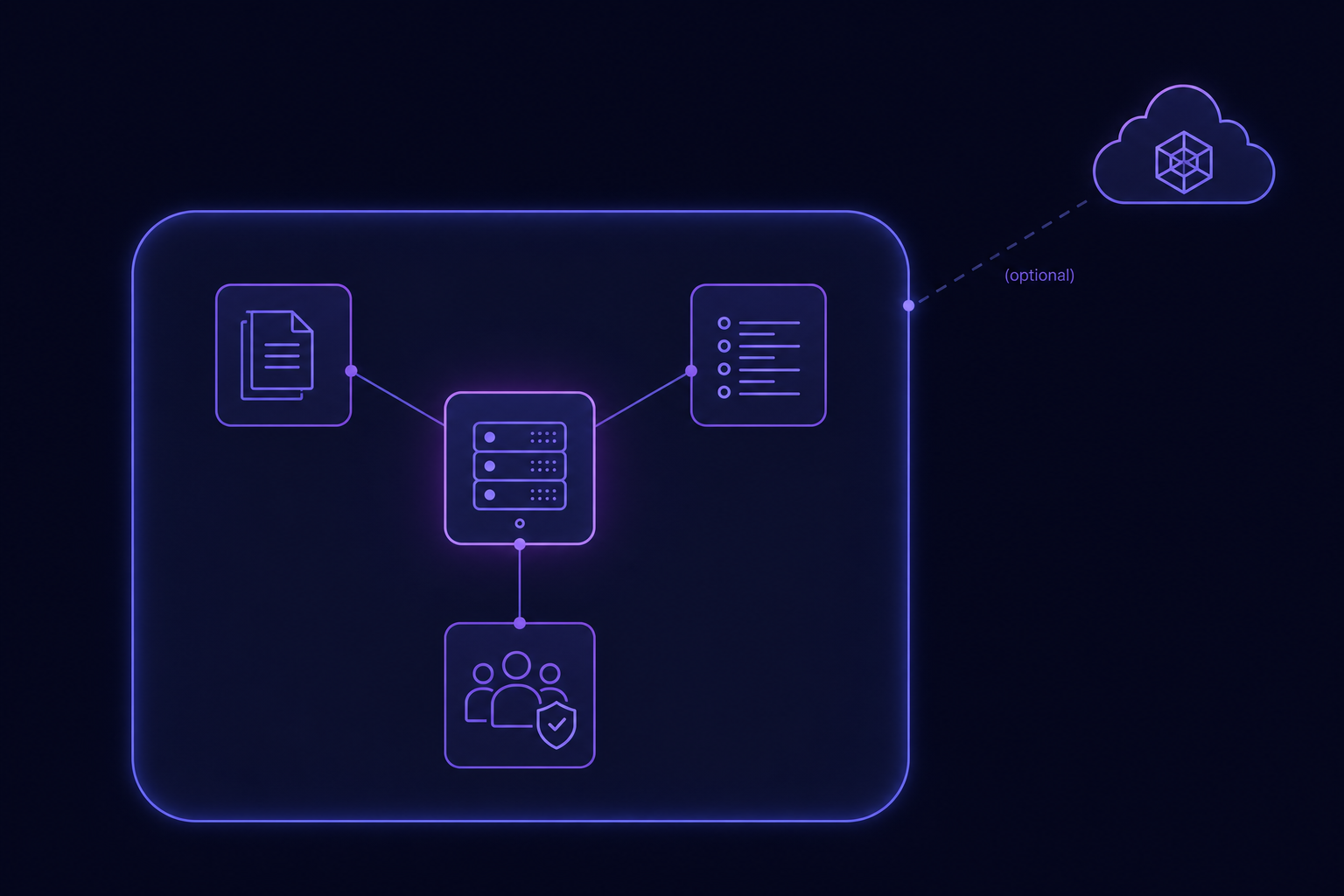
Your environment
Architecture diagram showing DECO, company documents, users, and audit controls inside a company-controlled environment, with an optional external AI provider.

If an external AI provider is selected, what leaves your environment depends on the workflow and configuration. Local-model options can reduce external data movement.

Available now

Private assistant, file workflows, skills, agents, roles, model choice, audit history, and controlled execution.

Scoped integration

Internal APIs, business systems, deployment architecture, and workflows configured for your policies.

Planned

Packaged connectors, single sign-on, and additional industry starter patterns.

A focused first step

Start with one process. Prove the value. Then expand.

A pilot keeps implementation practical and gives your team a clear workflow to evaluate.

  1. 1

    Choose a process

    Pick a repetitive, document-heavy, or rules-based task with a clear owner.

  2. 2

    Map the workflow

    Define the inputs, steps, rules, outputs, access, and review points.

  3. 3

    Run a pilot

    Test the agent with real cases, compare the output, and refine the guardrails.

  4. 4

    Expand deliberately

    Add teams and workflows where the pilot shows a strong operational fit.

Frequently asked questions

Questions to ask before you bring AI into a workflow.

What is DECO?
DECO is a secure AI work platform for turning repetitive tasks and internal processes into reusable workflows. Teams can use a private assistant, build no-code skills, combine them into agents, and review what each workflow did.
Does our team need AI or programming experience?
No. Team members use a familiar conversational interface, and approved workflows can be created with no-code forms. Ciffly can help your administrators map and configure the first workflow.
Where does our data go?
DECO can be deployed in infrastructure controlled by your organisation. If you choose an external AI provider, the data sent to that provider depends on the workflow and configuration. Supported local models can be used where stricter isolation is needed.
Can we choose the AI models DECO uses?
Yes. DECO is designed to work with approved cloud AI providers or supported local models. The final choices depend on your deployment, security requirements, and the workflows you want to run.
How does DECO make calculations and file processing more reliable?
Approved skills can run calculations and file-processing steps in a controlled execution environment instead of relying only on a generated answer. The inputs, steps, and outputs can then be reviewed.
Can DECO connect to our existing systems?
Uploaded documents and files are supported today. Connections to internal APIs and business applications can be scoped as custom integration work. Packaged connectors for common tools are planned and should not be assumed to be available yet.
Can we audit what DECO has done?
Yes. DECO can record conversations, uploaded files, executed skills, and agent actions so authorised administrators can review and export the activity relevant to their deployment.
What is available now, and what is planned?
The private assistant, document workflows, no-code skills and agents, role-based controls, model choice, audit history, and controlled execution are available now. Business-system connections require scoping. Packaged connectors and single sign-on are planned.
Can we start with one workflow?
Yes. A pilot can begin with one repetitive, document-heavy, or rules-based process. We map it, configure the workflow, test it with your team, and use the results to decide where to expand.
Build AI around your business

Bring us one process. We’ll show you what DECO can do.

Request early access to explore a real workflow, the deployment options, and the controls your team needs.

  • See a workflow relevant to your team.
  • Discuss private deployment, models, access, and auditability.
  • Identify a practical first pilot.

Prefer email?

team@ciffly.com

Request Early Access

Tell us enough to make the conversation useful.

Thanks. We’ll be in touch.

We’ll use the information you shared to prepare a more relevant DECO conversation.

Hi, I'm Lily. Shall I show you around?

I'll walk you through DECO in about two minutes, in plain language with real examples. You can pause, mute, or close the tour anytime.

The big idea

Paused. Press play when you're ready.

1 / 10

That's the full tour.

Ready to explore what DECO could automate for your team? Request early access and bring one process you would like to improve.